


Opera GX: Gaming Browser
4.67.65K Reviews
App Specs
- Version
- 3.3.4
- Updated On
- License
- Free
- Downloads
- 10,000,000+
- Developer
- Opera
- Categories
- Communication
- Platform
- Android, iOS
Screenshots

 Analysis by AppCompare
I reach for a mobile browser most often when I need to look something up without interrupting whatever else I’m doing: checking a game detail, opening a link from a chat, or comparing a few pages before I forget what I was searching for. That everyday role is where Opera GX makes its strongest case. It brings a gaming-themed look and a few gaming-oriented touches to ordinary web browsing, while remaining useful even when the page I need has nothing to do with games.
Opera makes this free communication app, and its gaming identity is easy to spot from the first screen. It has a 4.6 average from around 337,000 ratings, with over 10 million installs, so it is not a niche experiment that only a handful of people have tried. I would consider it if I wanted a browser that feels more personal than the default option on my phone, but I would not assume that a gamer-focused design automatically makes every part of browsing better.
A sensible routine for everyday browsing
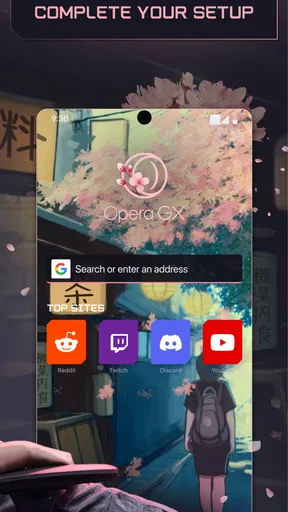
My most useful approach is to keep the browser’s home screen practical rather than treating it as a decoration project. I would make the starting page suit the things I actually open often, then use it as a quick launch point for searches, game information, and saved pages. The visual customization is enjoyable, but it works best when it supports a repeatable habit instead of becoming a reason to keep adjusting the screen.
Picture a familiar evening: a friend mentions a game in a group chat, and I want to check its details while a video or game is already open elsewhere on the phone. Opera GX gives that lookup a distinct home, and its gaming-focused material can help me browse related news or upcoming releases without starting from a generic blank page. I still decide what deserves my attention; the benefit is having relevant browsing close at hand, not having the app make the choice for me.
Settings that are worth a deliberate look
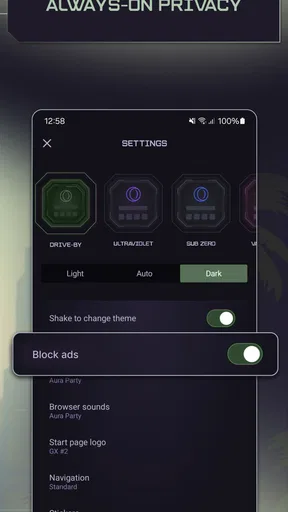
I would spend a little time with the appearance controls early on, but stop once the colors and background are comfortable to read. A high-contrast theme may look striking in a screenshot and still make long articles tiring. The sound effects are another personal choice: they add character, though anyone who regularly browses in quiet rooms may prefer a less theatrical setup. Small adjustments like these make a more lasting difference than changing the theme every few days.
The app’s ad blocker and free VPN feature are also settings to understand in context rather than magic switches. An ad blocker can make pages less cluttered, but individual sites may behave differently when their ads are blocked. A VPN can be useful when I want an additional privacy layer while browsing, but I would not treat it as a guarantee of complete anonymity or as a substitute for thinking carefully about accounts, downloads, and the information I share.
Faster patterns, not just a gaming look
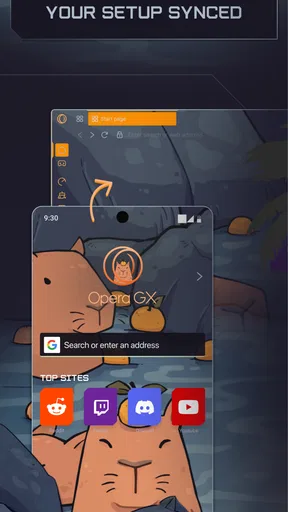
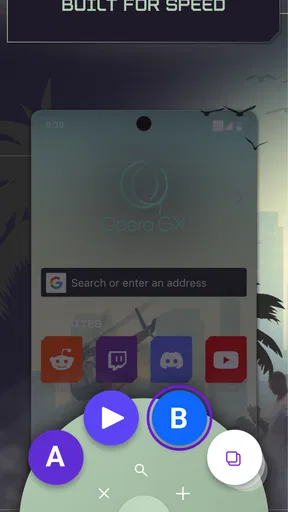
The browser becomes more useful when I build a few small habits around it. I can save a page I expect to revisit, keep my home screen focused, and use the tab interface to return to the right search rather than repeatedly starting over. If I use Opera GX on desktop as well, syncing can reduce the friction of moving between devices: bookmarks and browsing history are the practical parts to rely on, while carried-over customization is a pleasant extra.
Worth Reading Before You Choose

EA SPORTS FC Mobile 26 Is a Bigger Football Game, but It Takes Time

Flipboard Shows What News Apps Must Do Beyond the Feed

Switching to Android Auto Means Rethinking Your Driving Routine

Google Calendar Makes a Crowded Week Easier to Manage

Ludo King Makes the Most of the Minutes Between Plans

Baby Panda World Brings Quick Play to Modern Phones, but Its Game Library Feels Busy
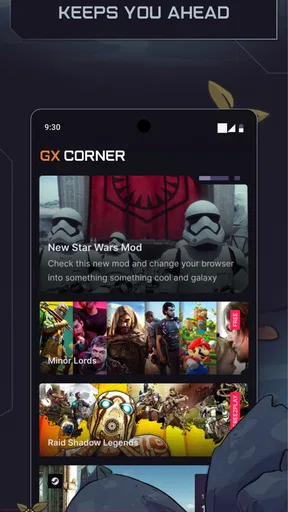
GX Corner is best treated as an optional stop, not a required part of every session. When I am curious about game releases, news, or discounts, it gives me a reason to browse within the app. When I only need a quick answer, opening a focused search is faster. That distinction matters: an interesting feed can make discovery enjoyable, but it can also turn a thirty-second lookup into a longer scroll if I do not have a clear purpose.
Where its gaming tools have limits
The desktop-minded idea behind GX Control sounds appealing, but expectations need to match the mobile setting. Its promise is to manage how much RAM and CPU the browser uses; that is not the same as turning a phone into a gaming performance booster. I would not expect it to fix a demanding game, and I would judge the browser by how it handles my web tasks rather than by assuming that its gaming branding can control every app running on the device.
That is also why the choice depends on the kind of browsing I do. If I want a plain, familiar browser that stays out of the way, the one already installed on my phone may be the better fit. If I value a customizable interface, enjoy game-related discovery, or already use the desktop version, Opera GX has more personality and a more coherent reason to switch. The trade-off is that its extra visual elements and gaming content will feel unnecessary to someone who wants the smallest possible mental footprint.
Who will enjoy the daily experience
I think it suits mobile gamers who browse around their hobby, people who like adjusting an interface, and anyone who wants their phone browser to feel less generic. It can also work for a casual user who simply likes its appearance; there is no need to be a competitive player to use a web browser. I would steer away from it if visual restraint is a priority, if game news is a distraction, or if I want every tool to be invisible unless I explicitly ask for it.
One practical question is whether it can replace a standard mobile browser. For me, that depends on what I expect from the default app. Opera GX can handle regular searches and pages while adding its own shortcuts and gaming-oriented home experience, so it can be a daily browser rather than a companion reserved for games. But if my existing browser already fits my habits and I do not care about the customization or GX Corner, changing apps may bring little benefit.
Another is whether the extra features are essential. They are not. I can use the browser for ordinary web pages and ignore GX Corner, sounds, or the VPN when they are not relevant. That modular feel is helpful: I do not have to turn every themed element into part of my routine. I would start with the basics, then keep only the features that solve a real problem or make browsing more enjoyable.
The app is free, carries an Everyone age rating, and was released on June 14, 2021. Version 3.2.10 requires Android 10 or later. Those details make it straightforward to assess whether it fits an Android device, while the version number is a reminder to check that the installed release is current before relying on a particular interface or setting. My recommendation is to try it as a browser first, not as a promise of better game performance.
Hey there, fellow mobile user! So, let me tell you about my latest adventure with the Opera GX: Gaming Browser. Yes, you heard right—a browser specifically designed for gamers. Intrigued? I was too, and here’s how it went down.
First Impressions and Setup
Kicking things off, downloading the Opera GX was a breeze. Just a quick tap on the App Store or Google Play, and I was ready to roll. The installation was smooth, and before I knew it, a sleek and futuristic interface greeted me. I felt like I was in the cockpit of a high-tech spaceship, ready to embark on a digital adventure.
The setup process was straightforward. A few taps here, a few permissions there, and bam—I was in. What immediately caught my eye was the customizable home screen. You can tweak pretty much everything, from the background to the accent colors. It’s like having your personal gaming hub, right on your phone.
Features That Stand Out
Now, let’s dive into what makes Opera GX a real game-changer. First up, the GX Control feature. This is a game-changer, literally. It allows you to manage your device’s performance by controlling how much RAM and CPU the browser uses. It’s like having a performance tuner right at your fingertips. No more laggy browsing while you’re in the middle of an intense gaming session!
Then there’s the integrated GX Corner, which is like having a personal gaming news assistant. It keeps you updated with the latest game releases, news, and even offers discounts. I found myself spending quite a bit of time here, exploring new games and reading up on gaming news.
Oh, and let’s not forget the built-in ad blocker. Browsing without interruptions? Yes, please! And if you’re into privacy, the browser comes with a free VPN feature, giving you an extra layer of security while you surf the web.
User Experience and Performance
Using Opera GX on my phone felt incredibly smooth. The transitions between tabs were seamless, and loading times were impressively quick. I didn’t experience any crashes or glitches, which is a huge win in my book. The browser feels optimized for gaming, yet it doesn’t compromise on the typical browsing experience.
The interface is intuitive and easy to navigate. Even if you’re not a tech whiz, you’ll find everything you need without getting lost in a sea of options. The touch gestures are responsive, and I loved how switching between tabs felt like flipping through a deck of cards.
Customization and Personalization
If you’re like me and love to personalize everything, you’re in for a treat. Opera GX lets you change themes, colors, and even sounds. Yes, you can have sound effects when you open a new tab or scroll through pages. It’s these small touches that add a layer of fun and uniqueness to the browsing experience.
You can also sync the browser with your desktop version of Opera GX, which is super handy. It’s a seamless transition from mobile to desktop without missing a beat. Your bookmarks, history, and even your customizations come along for the ride.
The Verdict
So, is the Opera GX: Gaming Browser worth it? Absolutely! Whether you’re a hardcore gamer or just someone who enjoys a smooth, customizable browsing experience, this app has something for everyone. It’s packed with features that enhance both gaming and regular browsing sessions, and the level of customization is just the cherry on top.
In a world where multitasking is the norm, having a browser that can keep up with both your gaming and browsing needs is a lifesaver. So why not give it a shot? Download Opera GX today, and let me know what you think. Happy browsing!
Pros
- Customizable gaming-focused features.
- Integrated tools for Twitch and Discord.
- CPU and RAM limiter for smooth performance.
- Built-in ad blocker enhances speed.
- Sleek and modern user interface.
Cons
- Limited extensions compared to Chrome.
- Initial setup can be complex.
- Occasional compatibility issues with sites.
- Resource-heavy for low-end devices.
- No direct support for older OS versions.
FAQs for Opera GX: Gaming Browser
What makes Opera GX different from other browsers?
Opera GX is specifically designed for gamers, offering unique features like GX Control, which allows you to manage your computer’s CPU and RAM usage. It also includes a network limiter to control bandwidth usage, ensuring smoother gameplay while browsing. Additionally, it integrates with gaming platforms and services, providing a seamless gaming experience.
How does the GX Control feature enhance gaming performance?
GX Control is a standout feature of Opera GX that allows users to set limits on CPU, RAM, and network bandwidth usage. This helps to optimize gaming performance by ensuring that the browser doesn’t consume resources that could otherwise enhance gameplay. It’s perfect for gamers looking to multitask without sacrificing performance.
Is Opera GX compatible with all gaming platforms?
Opera GX is compatible with most popular gaming platforms and services. It seamlessly integrates with platforms like Twitch and Discord, providing notifications and easy access directly from the browser. This compatibility ensures that gamers can stay connected and engaged with their gaming communities while browsing.
What privacy features does Opera GX offer?
Opera GX comes with built-in privacy features such as a free VPN, ad blocker, and tracker blocker. These features help protect user data and enhance online privacy. The VPN is easy to activate and can help access content that might be restricted in certain regions, making it a secure choice for privacy-conscious gamers.
Can Opera GX be customized to match my gaming setup?
Yes, Opera GX offers extensive customization options. Users can personalize the browser with various themes, sound effects, and colors. The GX Corner provides gaming news and deals tailored to your preferences, making it easy to align the browser’s aesthetic and functionality with your gaming setup.


